What is Copying Objects?
Copying objects in JavaScript is different from copying primitive data types. Primitive types such as number, string, boolean,null, undefined, and symbol are copied by value, whereas objects are copied by reference.
Copying Primitive Data Types
When you assign a primitive value to another variable, it creates an independent copy.
let a = 10;
let b = a; // Copy by value
b = 20;

console.log(a); // Output: 10 (original remains unchanged)
console.log(b); // Output: 20 (new copy is modified)
Copying Objects - Reference Behavior
In JavaScript, objects are stored by reference. When you assign an object to another variable, it does not create a new copy— it only copies the reference. This means that changes made to one object will reflect in the other if they reference the same memory location.
Example: Reference Copyinglet obj1 = { name: "Prakash", age: 25 };
let obj2 = obj1; // Copy by reference
Let's understand above example better with below diagram
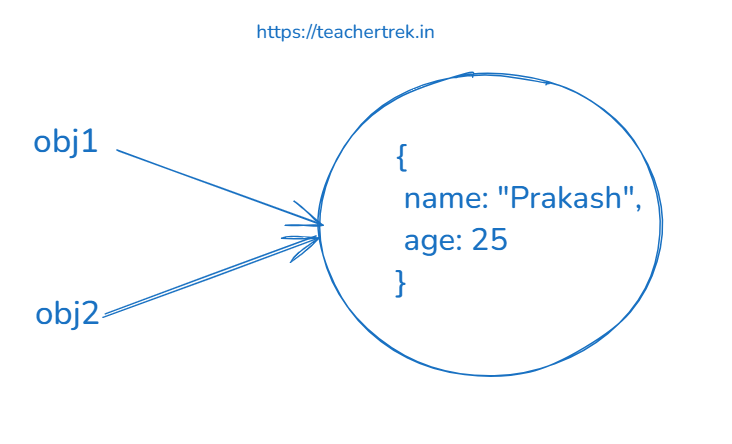
obj2 is referencing the same object."What happen when if we modify obj1 in above example? Let's see
let obj1 = { name: "Prakash", age: 25 };
let obj2 = obj1; // Copy by reference
obj2.age = 30;
console.log(obj2.age); // Output: 30
console.log(obj1.age); // Output: 30 (original object is also modified)
console.log(obj1 === obj2); // Output: true (both variables point to the same object)Both obj1 and obj2 reference the same object in memory, so modifying obj2 also affects obj1 as you saw in above example, and obj1 === obj2 returns true because they share the same reference.
When Are Two Objects Equal?
Two objects are equal only if they reference the same memory location.
Even if two objects have identical properties and values, they are considered different if they occupy separate memory locations.
Example: Objects with Different References
let emptyObj1={}
let emptyObj2={}

console.log(emptyObj1===emptyObj2); // Output: false (different memory locations)

let obj1 = { name: "Prakash", age: 25 };
let obj2 = { name: "Prakash", age: 25 };

console.log(obj1 === obj2); // Output: false (different memory locations)
Understanding Shallow Copy and Deep Copy in JavaScript
In JavaScript, copying objects can be categorized into two types:Shallow Copy and Deep Copy. Understanding the difference is crucial to avoid unintended side effects when modifying objects.
Shallow CopyA shallow copy creates a new object, but only copies the top-level properties. If the original object has nested objects, they are still referenced rather than fully copied.
Let's understand the concept with an example using Object.assign():
let obj1 = {
    name: "Prakash",
    age: 25,
    address: { city: "New York", zip: 10001 }
};

// Creating a shallow copy using Object.assign()
let obj2 = Object.assign({}, obj1);

obj2.name = "Bob";
obj2.address.city = "Los Angeles";

console.log(obj1.name); // Output: Prakash (Unchanged)
console.log(obj1.address.city); // Output: Los Angeles (Changed!)

console.log(obj1 === obj2); // Output: false (Different objects)
console.log(obj1.address === obj2.address); // Output: true (Same reference)
We can also create a shallow copy using the spread operator:
let obj1 = {
    name: "Prakash",
    age: 25,
    address: { city: "New York", zip: 10001 }
};

// Creating a shallow copy using spread operator
let obj2 = { ...obj1 };

obj2.name = "Bob";
obj2.address.city = "Los Angeles";

console.log(obj1.name); // Output: Prakash (Unchanged)
console.log(obj1.address.city); // Output: Los Angeles (Changed!)

console.log(obj1 === obj2); // Output: false (Different objects)
console.log(obj1.address === obj2.address); // Output: true (Same reference)
As seen in both examples above, obj2 is a new object, but the address property is still a reference to the original object, meaning changes to obj2.addressalso affect obj1.address. This is why it is called a shallow copy.
A deep copy creates a completely independent copy of an object, including all nested objects. This ensures that modifying one object does not affect the other.
Let's create a deep copy using JSON methods:
let obj1 = {
    name: "Prakash",
    age: 25,
    address: { city: "New York", zip: 10001 }
};

// Creating a deep copy using JSON
let obj2 = JSON.parse(JSON.stringify(obj1));

obj2.name = "Bob";
obj2.address.city = "Los Angeles";

console.log(obj1.name); // Output: Prakash (Unchanged)
console.log(obj1.address.city); // Output: New York (Unchanged!)

console.log(obj1 === obj2); // Output: false (Completely different objects)
console.log(obj1.address === obj2.address); // Output: false (Different reference)
As seen in the above example, the deep copy ensures that changes to obj2do not affect obj1. Even nested objects are copied separately.
Another way to create a deep copy is using structuredClone():
let obj1 = {
    name: "Prakash",
    age: 25,
    address: { city: "New York", zip: 10001 }
};

// Creating a deep copy using structuredClone
let obj2 = structuredClone(obj1);

obj2.name = "Bob";
obj2.address.city = "Los Angeles";

console.log(obj1.name); // Output: Prakash (Unchanged)
console.log(obj1.address.city); // Output: New York (Unchanged!)

console.log(obj1 === obj2); // Output: false (Completely different objects)
console.log(obj1.address === obj2.address); // Output: false (Different reference)
Comparison: structuredClone() vs JSON.stringify()
| Feature | JSON.stringify() | structuredClone() |
|---|---|---|
| Deep Copy | ✅ Yes | ✅ Yes |
| Preserves Date | ❌ No (converted to string) | ✅ Yes |
| Works with Map, Set | ❌ No (removed) | ✅ Yes |
| Works with ArrayBuffer | ❌ No | ✅ Yes |
| Handles Circular References | ❌ No (causes error) | ✅ Yes |
Shallow Copy vs. Deep Copy - Key Differences
- Shallow Copy: Only copies top-level properties; nested objects remain referenced.
- Deep Copy: Creates a completely independent copy, including nested objects.
- Shallow Copy Methods:
Object.assign(), spread operator...obj. - Deep Copy Methods:
JSON.parse(JSON.stringify(obj)),structuredClone(), or libraries like Lodash'scloneDeep().
Key Takeaways
- Objects are stored by reference, not by value.
- If two objects reference the same memory location, they are equal (
obj1 === obj2). - Even if two objects have identical properties and values, they are not equal unless they reference the same object.
- Use
JSON.stringifyor Lodash's_.isEqualfor deep comparison of objects.